
Manual
.png "Black and White Geometri Open Here Square Sticker (1)")
.png "Black and White Geometri Open Here Square Sticker (2)")
.png "Black and White Geometri Open Here Square Sticker (3)")

.png "Black and White Geometri Open Here Square Sticker (4)")
.png "Black and White Geometri Open Here Square Sticker (5)")
.png "Black and White Geometri Open Here Square Sticker (8)")
.png "Black and White Geometri Open Here Square Sticker (6)")
.png "Black and White Geometri Open Here Square Sticker (7)")

-1.png "Black and White Geometri Open Here Square Sticker (1)-1")
.png "Copy of Black and White Geometri Open Here Square Sticker (1)")
We want to make sure you and your team know exactly who to reach out to for support. Below are the key contacts both within CU Health and beyond.
CU Health Contacts
Client Relationship Manager – Mehreen Javed
Mehreen is here to support the HR representative of your company with special requests, questions, or general support.
Phone: 02 9016 1529
Email: mehreen.javed@cuhealth.com.au
Member / Employee Support
This support line is available to all employees of your business for any questions, issues accessing the platform, or general assistance.
Phone: 1300 284 325
Email: support@cuhealth.com.au
___________________________________________________________________________________________________________________________________________________________
Additional Mental Health & Wellbeing Support
AUSTRALIA
Beyond Blue
Beyond Blue provides support, information, and resources for people experiencing anxiety, depression, or suicide-related issues. They offer free 24/7 phone and online support.
Phone: 1300224636 (call a counsellor)
Online-Chat: https://www.beyondblue.org.au/get-support/talk-to-a-counsellor/chat
Website: 24/7 Support for Anxiety, Depression and Suicide Prevention. - Beyond Blue
MensLine Australia
MensLine is a free telephone and online counselling service providing support to Australian men, anywhere and anytime.
Phone: 1300 78 99 78
Online –Chat: https://mensline.org.au/phone-and-online-counselling/
Video- Chat: https://mensline.org.au/phone-and-online-counselling/
Website: Free help, referrals & counselling for men: MensLine Australia
Lifeline Australia
Lifeline is a national charity offering 24/7 crisis support and suicide prevention services. Their mission is to ensure no one in Australia faces their darkest moments alone.
Phone: 13 11 14
Online-Chat: https://www.lifeline.org.au/crisis-chat/
SMS Support : 0477131114
Website: Lifeline Australia - 13 11 14 - Crisis Support. Suicide Prevention.
NEW ZEALAND
Mental Health Foundation of New Zealand
Offer free, confidential 24/7 support for anyone in New Zealand, providing resources to help with your well-being. If you need brief emotional support, text or chat with us at 1737 anytime.
24/7 Mental Health Lines: https://mentalhealth.org.nz/helplines#national-247-helplines
1737
Need to talk? Free call or text 1737 any time for support from a trained counsellor
Lifeline New Zealand
Phone: 0800 543 354 (0800 LIFELINE)
Free text support: 4357 (HELP)
Suicide Crisis Helpline: 0508 828 865
Samaritans
People experiencing loneliness, depression, despair, distress or suicidal feelings and would like to talk with one of our volunteers.
Phone: 0800 726 666
We highly recommend that once CU Health is launched within your organisation, you actively encourage your team to register on the platform.
When members first sign up, they’ll be asked to provide some important details such as their address, phone number, and emergency contact. A Health Check tool is also available to them – this is a great way for our team to get an overall snapshot of their health and wellbeing. Based on their responses, we may also share tailored health resources to support them.
As part of our partnership, we’ll work closely with you to drive engagement and aim for registration levels of at least 80% across your organisation. This ensures your team gains full access to the support available and helps us deliver meaningful impact across your workforce.
Once registered, employees can access a wide range of features designed to support their health and wellbeing, including:
- Booking appointments with our healthcare team
- Exploring the video library for expert led content on mental health, lifestyle and nutrition
- Using the Psychology Toolbox with guided audio courses, videos and worksheets
- Fertility support – members considering their options can book a free 20-minute chat with a fertility nurse
Don’t worry - we’re here to support you every step of the way!
When you first launch with CU Health, we’ll work closely with your team to announce our partnership and highlight the new wellbeing support available to your employees.
There are two ways to do this:
Virtual Launch – A member of our team will join a virtual session with you and your organisation to introduce CU Health, explain what we do, and outline how we’re here to support your team. (You are welcome to record this session and circulate to your team who could not attend)
Pre-recorded Introduction – If scheduling a live session is difficult, we’ve got you covered. We can provide short, pre-recorded videos that you can share with your team via email or internal channels.
We have a draft for you to use if you like! See below.
Once the official launch date is set and employees have been informed, we’ll (with your permission) also send a welcome email to your team encouraging them to register on the platform.
We also recommend you send an email to the team introducing our services, suggested email below.
_______________________________________________________________________________________________________________________________
Draft email to employees from the Employer
Subject: Exciting News – Your New Health & Wellbeing Benefit!
Dear Team,
We’re pleased to announce that we’ve partnered with CU Health to provide you with a new benefit designed to support your health and wellbeing.
From today, you’ll have access to a full healthcare team – including GPs, psychologists, dietitians, health coaches and performance coaches all through the CU dashboard. [review this section and tweak based on the offering agreed for your business and the launch date of this service]
As part of our special offering included in this package is:
-
-
-
-
[This is where you can be specific on limitations or allocations]
This service is completely confidential and designed to make it easier for you to prioritise your health and wellbeing. Whether you need medical advice, mental health support, nutritional guidance or ongoing coaching, CU Health is there to help.
Getting started is simple:
CU Health will send you an email, so keep an eye out for it! Following the steps to register your own account to the platform.
[This may not be applicable if you have SSO requirements]
That’s it! Jump on, explore and take charge of your health and wellbeing.
We believe supporting your wellbeing is one of the most important things we can do, and we’re excited for you to take advantage of this new benefit.
Before getting started, we kindly ask that you take a moment to read the CU Health cancellation policy and assure adherence to it: https://www.cuhealth.com.au/cancellation-policy
If you have any questions, please reach out to [insert HR contact].
If you need any support from the CU team in relation to accessing your dashboard, reach out to 1300 or support…
Best regards,
[Client’s Business Name]
Like every organisation, people come and go. To keep things simple, we’ll provide you with access to CoPilot that allows you to easily let us know when employees join or leave your business.
We highly recommend including CU Health as part of your onboarding and offboarding process. This ensures every employee has access to the support they need, right from the start.
Using the CU Health Client Portal – Co-pilot
After launch, it is important to familiarise yourself with our client portal, Co-pilot. This will be your central hub for managing CU Health within your organisation – and is an important piece for your HR/P&C team to be across.
Through Co-pilot, you can:
- Submit new member forms – onboard new employees quickly and easily.
- Submit member offboarding forms – remove access when an employee leaves your organisation.
- View your member lists - shared with you at the end of each month.
- Access reports (if included in your package) – view utilisation data and wellbeing insights for your workforce.
- Download CU Health marketing collateral – ready-to-use materials to promote CU Health to your team.
- Use the messaging service – communicate directly with the CU Health team for support or queries.
Why it matters:
Maintaining accurate records in Co-pilot is essential. It ensures that only current employees have access to CU Health, while those who leave your organisation are offboarded promptly. If outgoing employees are not removed correctly, they may continue to access CU Health, which can lead to privacy or security risks and inaccurate reporting. This protects both your business and your employees and ensures CU Health can provide the right support to the right people.
It is equally important that any new or transitioning HR / People & Culture staff are trained in how to use Co-pilot. This guarantees continuity, avoids disruption for your employees, and helps your organisation get the full value from CU Health.
How to get started with Co-pilot
During the time of your launch planning with CU Health, it will be decided who will get Co-pilot access from your organisation. If you have joined your organisation after CU Health’s launch – then please speak to your HR/P&C Team to request access for you.
CU Health will then send you an invitation to join Co-pilot. It should look something like this:
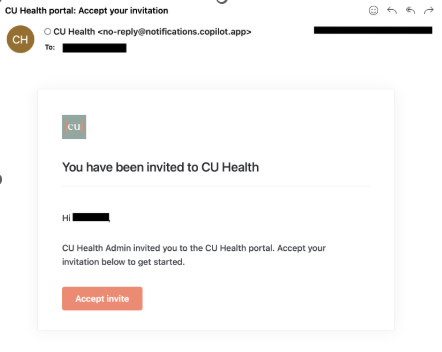
If you do not receive this email, please let CU Health know as soon as possible and we will then resend this to you, or provide you with an activation link.
Once you click “Accept invite”, you will be taken to a screen to set your password and then login to your portal:
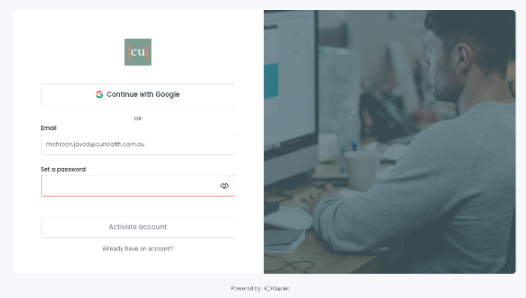
(If you struggle with any off this process, please contact us right away with screenshots + explanations of your issue and we will look into this)
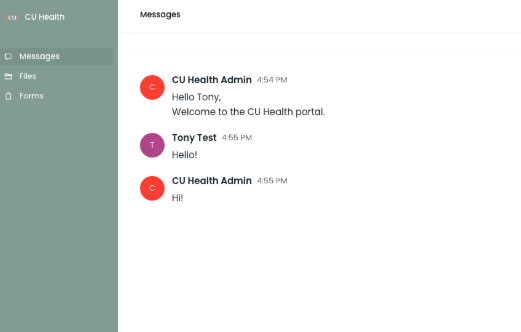
After you successfully set a password and click “Activate account”, you will arrive on your Co-pilot Dashboard which will look something like this:
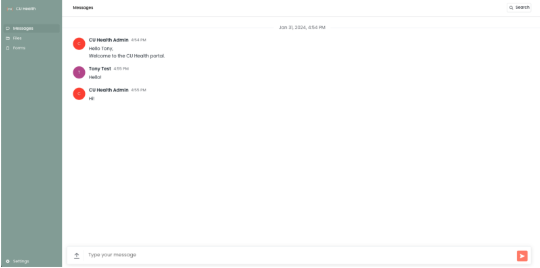
Messages:
The Messages section will allow you to get in touch with our team with any questions you may have. This can include questions about the report, getting an updated members’ list or any other requests that you may have central to Co-pilot.
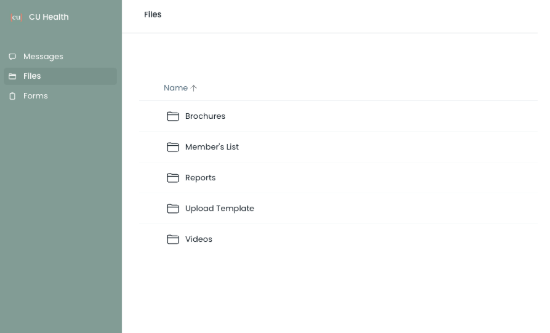
The Files section is where you can access documents such as; brochures/marketing collateral, members’ lists, reports (if included in your package) and any other materials:
Forms:
The Forms section is likely where you will spend most of your time, as this is where you will manage the onboarding and off-boarding of members. Here is what these forms are located in Co-pilot:
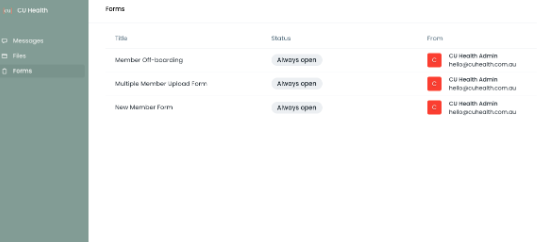
- Member Off-boarding: Use this form when a member leaves your company, business, or organisation.
- Multiple Member Upload Form: Use this form to add a bulk number of members to the system at once.
- New Member Form: Use this form when adding a new joiner who requires access to CU Health.
At the end of each month, we provide updated members lists under the Files > Member’s List folder. Please ensure you cross-reference these lists with your records to confirm that all information is accurate and up-to-date.
At CU Health, we are committed to supporting the health and wellbeing of your organisation. Beyond providing individual access to our services, we also partner with you to deliver initiatives that create impact at a team or organisational level. These activities are designed to:
- Boost employee engagement and morale- Encourage proactive health management
- Create opportunities for shared learning and conversations about wellbeing
- Build a culture that values health in the workplace
You can request from a range of services tailored to your organisation’s needs, including:
Online Webinars – Interactive and informative sessions on a variety of health and wellbeing topics.On-site Skin Checks – Preventative checks to help identify early signs of skin health issues.
On-site Health Checks – Practical health assessments that provide employees with personalised insights.
If you would like to arrange any of the above, please complete our Service Request Form here: https://form.jotform.com/252368387206059
If your enquiry falls outside of the form options (eg: flu vaccinations), please send an email to your Client Relationship Manager regarding your query and they should be able to assist you.
CU Health appointments are scheduled based on the member’s home address time zone. This means the appointment time will remain fixed to that time zone, even if the member is travelling interstate or overseas. CU Health aims to commence consultations promptly at the scheduled time. If a member has not joined the consultation within 5 minutes of the scheduled start time, the Healthcare Practitioner may cancel the appointment.
Your organisation will have chosen one of two ways for employees to access appointments with us.
Voucher-based access
If your organisation is voucher-based, the number of vouchers available to each employee will have been set during launch planning and contract signing. These vouchers will automatically appear in an employee’s account when they log in, making it simple to get started.
If an employee would like extra vouchers beyond the agreed amount, they will’ll just need to confirm this with their HR team. We can then add more vouchers on a case-by-case basis. It’s helpful if this process is clearly communicated to employees as part of launch planning.
Open access
If your organisation has chosen an open package, employees can book from the appointment types agreed during contract discussions. There’s no limit on the number of appointments, your team can book as needed.
Family Offering and Eligibility
Your organisation may choose to extend CU Health access to eligible family members as part of your service offering. Eligibility for family member access is determined and approved by your organisation (please refer to your contract to confirm if you have the Family Offering).
If a family member requests access, you (or your designated organisational contact) will need to confirm their eligibility. Once approved, your organisation must notify CU Health so we can create an account and enable access. Family members cannot independently register or access services without organisational approval and account setup by CU Health.
All CU Health consultations are delivered on an individual basis. To ensure clinical appropriateness and confidentiality, please reinforce the following appointment eligibility rules with your employees and eligible family members:
Individual appointments only
The person who books the appointment must be the person who attends and receives the service. Appointments cannot be booked on behalf of another person or transferred to a spouse, partner, or family member. For example, an employee cannot book an appointment under their name for their partner to attend instead.
No joint or couple consultations
CU Health provides individual consultations only. Joint sessions, including couple or relationship counselling involving two participants, are not permitted. However, clinicians can support the individual member with relationship-related concerns and provide referrals to appropriate external providers if required.
Age eligibility
CU Health services are currently available to members aged 17 years and over. Individuals under 17are not eligible to access services at this time. If this eligibility criteria changes in future, your organisation will be notified.
These requirements ensure services are delivered safely, confidentially, and in line with clinical best practice. We recommend clearly communicating these guidelines to employees to prevent booking issues and ensure appropriate use of the service.
Cancellation Policy – Why It Matters
To make sure all employees have fair and timely access to appointments, it’s important that everyone understands our cancellation policy. Missed appointments or last-minute cancellations not only mean lost time for our health professionals, but they also impact your organisation, as charges apply for no-shows and late cancellations. Clear communication of this policy to your team is the best way to avoid unnecessary costs. Our cancellation policy can be found here: https://www.cuhealth.com.au/cancellation-policy
For Organisations with Open Package (3-Strike Policy)
To encourage responsible booking, we use a 3-strike rule.
- Late cancellation: Cancelling within 24 hours of an appointment counts as a strike.
- Rescheduling within 24 hours: Also counts as a strike.
- No-show: Missing an appointment without notice counts as a strike.
- Once a member reaches 3 strikes, their account is temporarily blocked from booking new appointments, and any future appointments are automatically cancelled. They will see a message encouraging them to contact our support team and their HR representative to discuss next steps.
If HR approves, CU Health can reset strikes and restore access.
For Organisations with Vouchers
When your organisation uses vouchers, the process is slightly different:
- Late cancellations (within 24 hours), last-minute reschedules, and no-shows still count toward cancellation tracking.
- The voucher for that booking is used up and shown in the member’s portal under “Cancelled.”
- The voucher cannot be reused for another appointment.
- Members can continue booking with remaining vouchers or via PAYG (pay-as-you-go). If a member would like a voucher reinstated, they need to contact HR for approval, and CU Health can manually reinstate it.
Key Takeaway for HR Teams
We recommend communicating this policy clearly to your employees during launch. This helps:
- Avoid unexpected costs to your organisation.
- Encourage employees to value their appointments.
- Ensure our health professionals’ time is used effectively, keeping access open for all members.
Responding to reports of suicide, self harm or threats to others:
If an employee expresses thoughts of self-harm, please note that CU Health, as an online healthcare provider, has limitations in the immediate support we can provide. It is critical that the person receiving this information:
Call 000 immediately (Call 111 for New Zealand) and report the situation so emergency medical services can attend to the employee.
If the employee is in the workplace, ensure they are not left alone. At least 1–2 colleagues should remain with them until emergency services arrive.
If the employee is not at work (e.g. they have called in), ask for their exact location so this can be passed on to emergency services.
Whilst it is recommended that follow up is conducted by the workplace, this should ideally be conducted by a manager or close peer with a positive relationship to the member.
Onsite Crisis
In the event of an onsite crisis (such as: critical health emergency on work premises):
Contact 000 immediately (Call 111 for New Zealand) for emergency assistance.
Notify the appropriate workplace health and safety officer or crisis lead as per your internal protocols.
Maintain a calm and safe environment for both the affected employee and others nearby.
Support from CU Health post Critical Event with Management
This can take the form of a telephone call with immediate managers to discuss initial actions, or a centralised brief regarding common reactions and support services available for staff. Please speak to your Client Relationship Manager to find out more.
Support from CU Health - Proactive
CU Health can provide Critical Incident Management training with a member of our Psychology team to help your leadership team respond confidently and appropriately to these situations.
Please speak with your Customer Relationship Manager to explore this option further.
Trauma Centre Australia
Trauma Centra Australia (TCA) is postured to be able to provide onsite support if deemed appropriate in the event of a crisis.
TCA is a recognised leader in dedicated trauma response, with over 30 years’ experience providing clinical assistance and emergency trauma response to businesses and individuals across Australia.
If your organisation has not yet activated this service but would like to explore it, please contact your Customer Relationship Manager to discuss adding this option to your agreement.
At CU Health, we believe in transparency, trust, and delivering a consistent, high-quality experience for all our members. To help make sure you know what to expect, and how we protect both your rights and our ability to serve you well, we have the following policies in place:
-
Cancellation Policy – so you understand how and when you need to cancel or reschedule, and what happens if things change last minute.
-
Privacy Policy – because your personal and health information is highly sensitive, we want you to know how we collect, use, store, and protect it.
-
Terms of Service – the rules of engagement. This covers what we each agree to when you use our services: responsibilities, rights, what you can expect from us, and what we ask of you.
We strongly encourage you to read these policies. They help ensure clear expectations on both sides, protect your privacy and wellbeing, and allow us to maintain a safe, fair, reliable service for everyone.
We have created a series of short video resources to guide you and your employees through the importance of some of our appointment types and how to book them. These videos are designed to make it easy for you to understand the benefits of each service and support your health journey.
Psychology Appointments
Click through then select the ellipsis (…) to download the video resource.
Annual Wellbeing Appointments
Click through then select the ellipsis (…) to download the video resource.
Health Check Tools
Click through then select the ellipsis (…) to download the video resource.
Introduction to CU Health
Click through then select the ellipsis (…) to download the video resource.
At CU Health, we’re committed to providing meaningful insights to help your organisation understand how employees are engaging with our services - while ensuring every member’s privacy is protected.
De-Identified Reporting
To maintain confidentiality, all reports we provide are fully de-identified. The level of reporting available depends on the number of active employees linked to your account. For smaller groups, additional privacy measures are applied to protect individual member identities.
Utilisation Reports (Provided with Monthly Invoices)
Each month, you’ll receive a de-identified usage summary attached to your invoice.
This summary includes:
- Service type
- Date of service
- Associated cost
Metrics Reporting
Our metrics reports provide a broader view of member engagement and appointment activity.
- Businesses with under 50 active members: Reports provided quarterly.
- Businesses with over 50 active members: Reports provided monthly.
- Businesses with 10 or fewer active members: Reports provided yearly.
Need Support or Missing Reports?
If you are not currently receiving reports or would like to review your account management inclusions, please contact the CU Health team to discuss your account management fees and reporting options.
Here you’ll find a range of posters promoting CU Health’s services. These can be printed and displayed around the office, even behind toilet doors, or anywhere suitable for promotional material. We’ve also included desktop backgrounds for digital promotion.
Download our promotional material pack here.